
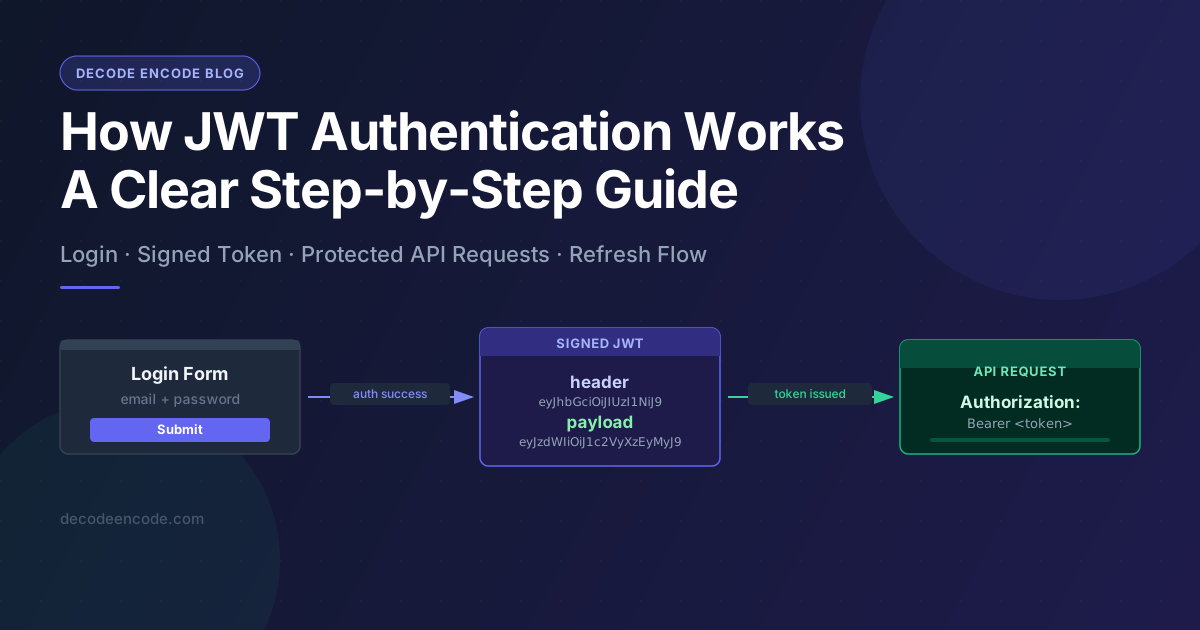
WHY does JWT authentication look so simple in a tutorial, but feel so confusing the moment something breaks in production?
You log in. A token appears. Requests start working. Then one day a user gets logged out for no clear reason, an expired token keeps showing up in network logs, or a teammate asks, "Wait, where is the session actually stored?"
That is where most developers realize they do not really understand JWT authentication. They only know the happy path.
This guide fixes that.
By the end, you will understand what a JWT is, what happens during login, how the browser uses the token afterward, where refresh tokens come in, and which mistakes make JWT setups fragile.
What is a JWT, really?
JWT stands for JSON Web Token. That sounds formal, but the idea is simple: it is a compact string that carries some claims about a user or system, and it is signed so the server can detect tampering.
The important word here is not "JSON." It is not even "token."
The important word is signed.
Why? Because a JWT is not trusted just because it exists. It is trusted only if the server can verify that it was created by a trusted signer and has not been altered.
Think about this question for a second:
If anyone can copy a token string, what stops them from changing the user ID inside it?
The answer is the signature. Without a valid signature, the token should be rejected.
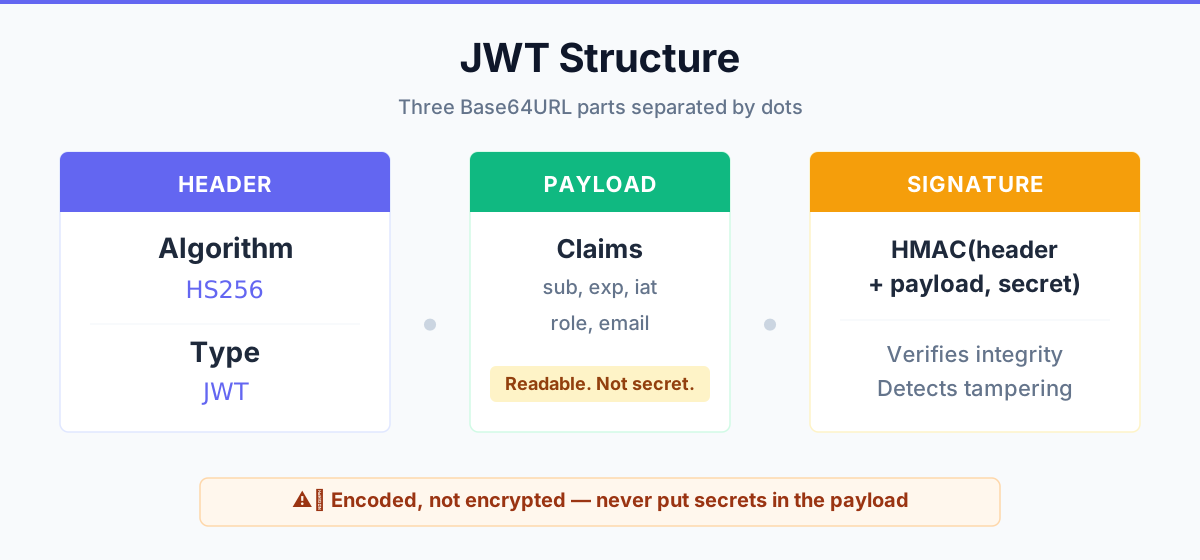
A JWT usually has three parts:
- Header
- Payload
- Signature
They are joined with dots:
xxxxx.yyyyy.zzzzzThe header says what algorithm was used.
The payload contains claims such as:
- who the user is
- when the token was issued
- when it expires
- who issued it
- which audience it is intended for
The signature is what makes the token verifiable.
Here is the part many people miss: a JWT is usually encoded, not encrypted.
So ask yourself this:
If you paste a JWT into a decoder and can read the payload, should that surprise you?
It should not. That is normal. If the token is only signed, the payload is visible to anyone holding it.
That means you should never put sensitive secrets inside a JWT payload just because it looks like random text.
 Click to expand
What actually happens when a user logs in?
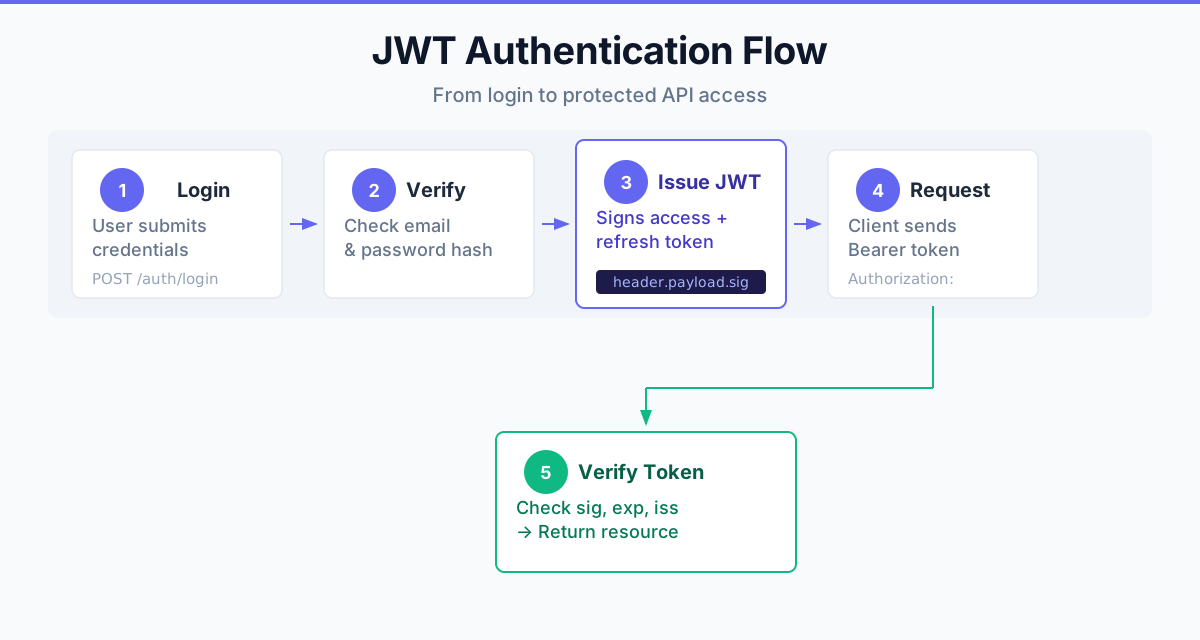
Let us walk through the full flow, step by step.
Step 1: The user submits credentials
The user enters an email and password into your login form.
Your frontend sends those credentials to your backend over HTTPS.
await fetch('/api/login', {
  method: 'POST',
  headers: { 'Content-Type': 'application/json' },
  body: JSON.stringify({ email, password })
})
At this point, there is no JWT yet. The server still needs to prove the user is valid.
Step 2: The server verifies identity
Your backend checks:
- does this user exist?
- is the password correct?
- is the account active?
- should extra checks run, like MFA or device verification?
Only after those checks pass should the server create tokens.
That raises an important design question:
Should the JWT itself perform authentication?
No. The login process authenticates the user. The JWT is what the system uses after authentication to represent that result.
Step 3: The server creates an access token
Once login succeeds, the server creates a short-lived access token.
It may contain claims like these:
{
  "sub": "user_123",
  "role": "admin",
  "iat": 1711785600,
  "exp": 1711789200,
  "iss": "decodeencode.com",
  "aud": "decodeencode-app"
}
Notice what is not there: password, API secrets, personal data you do not need, or anything you would be embarrassed to see in logs.
That is a good rule of thumb.
If a claim is not necessary for authorization or validation, why put it in the token at all?
Step 4: The token is sent back to the client
The backend returns the access token, and sometimes also a refresh token.
This is where architecture decisions start to matter.
Where will you store it?
httpOnlycookie?- memory only?
localStorage?
Each option has tradeoffs. The safest common choice for many web apps is an httpOnly, secure, sameSite cookie for the refresh token, while the access token is kept short-lived and handled carefully.
Step 5: The client sends the token on future requests
For protected API requests, the client includes the access token.
Authorization: Bearer <access-token>Now every protected endpoint can verify the token signature, check expiration, inspect claims, and decide whether the request is allowed.
That is the core loop of JWT authentication.
 Click to expand
Where do access tokens and refresh tokens fit in?
This is where confusion usually starts.
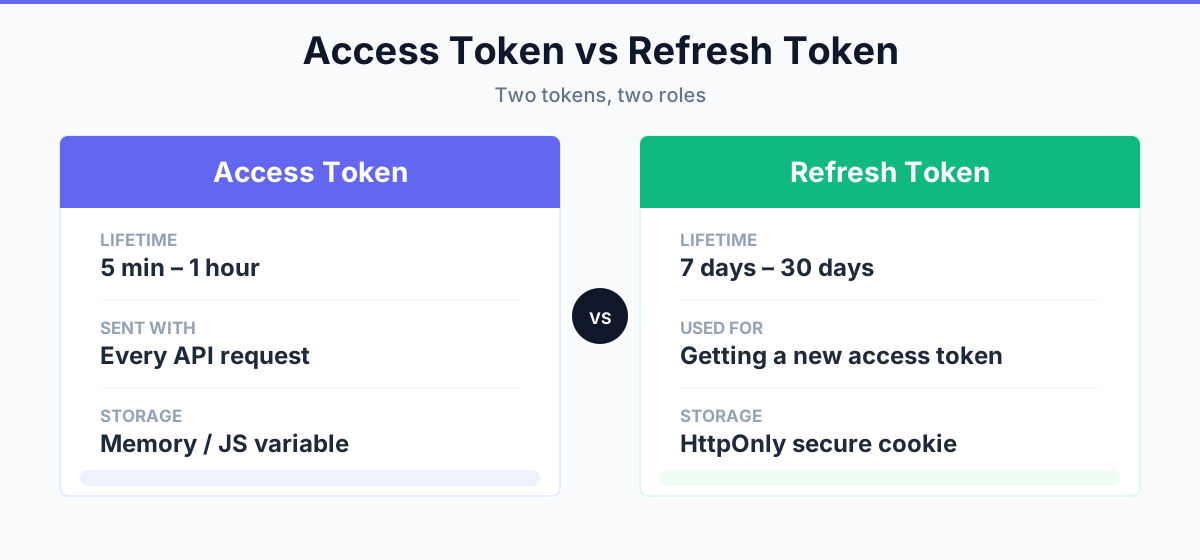
An access token is typically short-lived. It is meant to be used often and expire quickly.
A refresh token is typically longer-lived. It is used to get a new access token without forcing the user to log in again.
Why not just create one token that lasts for 30 days?
Because that increases the damage if the token is stolen.
If a short-lived access token leaks, the blast radius is smaller. If a refresh token leaks, that is more serious, which is why refresh-token handling should be much stricter.
Here is the simplified model:
- User logs in
- Server issues access token + refresh token
- Access token expires after a short period
- Client uses refresh token to obtain a new access token
- User continues without seeing a login screen
If you have ever wondered, "Why did my app suddenly start failing after 15 minutes?" the answer is often that token refresh logic is missing, broken, or racing.
 Click to expand
What happens when the server receives a JWT?
The server should not simply decode the token and trust the payload.
That is a dangerous shortcut.
Instead, it should validate at least these things:
- The signature is valid
- The token is not expired
- The issuer is correct
- The audience is correct
- The token uses an allowed algorithm
- Any required claims are present
This matters because decoding is easy. Verification is the real security step.
Ask yourself:
If your code only calls "decode" and never "verify," is it actually authenticating anyone?
It is not.
That mistake appears in more codebases than people like to admit.
A simple mental model that makes JWT easier
If JWT has felt abstract so far, use this model:
- authentication answers: "Who are you?"
- authorization answers: "What are you allowed to do?"
- the JWT is the signed note the system carries around after authentication
That signed note is not magic. It is just a portable proof that says, "This user logged in, and here are the claims we want downstream systems to know."
But then another question appears:
If the token already contains the user role, does the database no longer matter?
Not necessarily.
For some systems, claims in the token are enough.
For others, permissions change often, and the server may still need a database lookup or a revocation check. JWT reduces state in some places, but it does not remove the need for thoughtful authorization design.
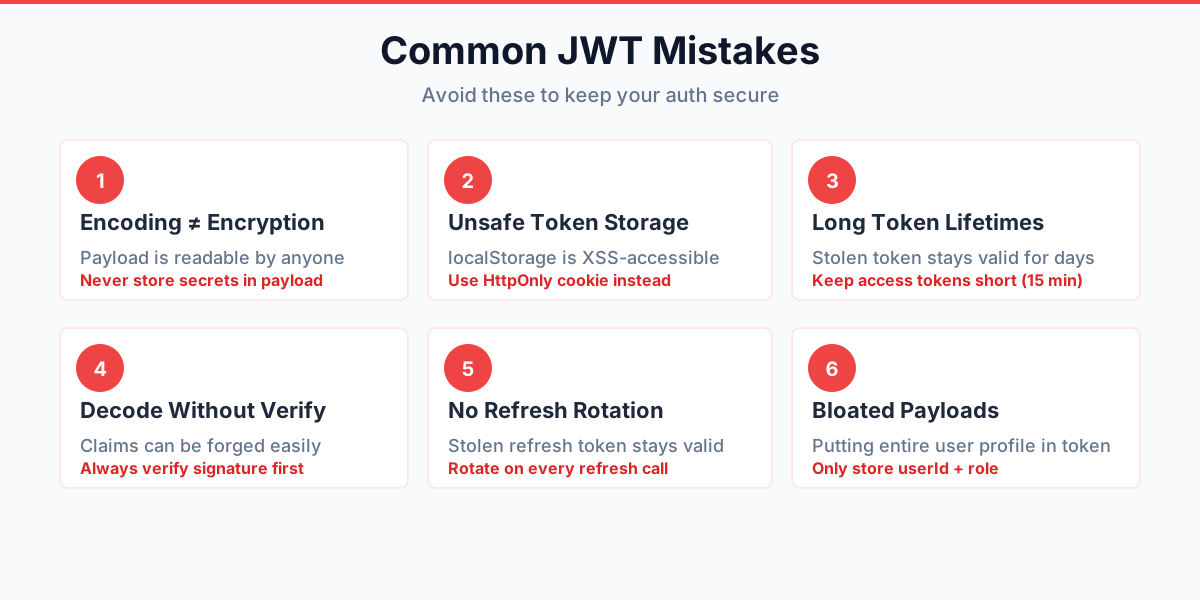
Common JWT mistakes developers make
This is the part worth reading twice.
1. Confusing encoding with encryption
If your payload contains emails, internal IDs, or private data, remember: anyone with the token may be able to read it.
2. Storing tokens carelessly
If you store high-value tokens where XSS can easily reach them, you are creating risk. Convenience is not the same thing as safety.
3. Letting tokens live too long
A 5-minute token and a 30-day token do not create the same security story.
4. Decoding without verifying
If the app trusts decoded claims before signature validation, the design is broken.
5. Forgetting refresh-token rotation or revocation strategy
What happens if a user logs out from all devices? What happens if a refresh token is stolen? If your system has no answer, it is unfinished.
6. Putting too much into the payload
JWT payloads should be useful, not bloated. Smaller tokens are easier to handle, safer to log, and less likely to leak unnecessary data.
 Click to expand
So when should you use JWT authentication?
JWT is useful when you need a compact, portable, signed identity token that works well across APIs, services, and modern frontends.
It is especially common in:
- SPAs calling APIs
- mobile apps
- distributed systems
- third-party integrations
- identity providers and SSO flows
But it is not automatically the best option for every app.
Would a simple server-side session be easier to reason about in your system?
Sometimes, yes.
JWT is not better because it is trendy. It is better only when its tradeoffs fit your architecture.
The easiest way to inspect a JWT when debugging
When something breaks, developers usually need quick answers:
- is the token expired?
- which claims are inside?
- which algorithm is used?
- did the wrong audience or issuer get attached?
That is exactly where a decoder becomes useful.
Use a decoder to inspect the token structure and claims quickly, but remember the boundary: decoding helps you understand the token, while verification tells you whether it should be trusted.
If you want to inspect a token safely in the browser, use the DecodeEncode JWT Decoder tool.
Final takeaway
JWT authentication is not hard because the idea is complicated. It is hard because too many explanations skip the real flow.
The flow is this:
- User proves identity
- Server creates signed token
- Client sends token on protected requests
- Server verifies token every time
- Refresh token keeps the experience smooth when access tokens expire
Once that clicks, JWT stops looking mysterious.
And here is the question worth keeping in your head the next time you debug auth:
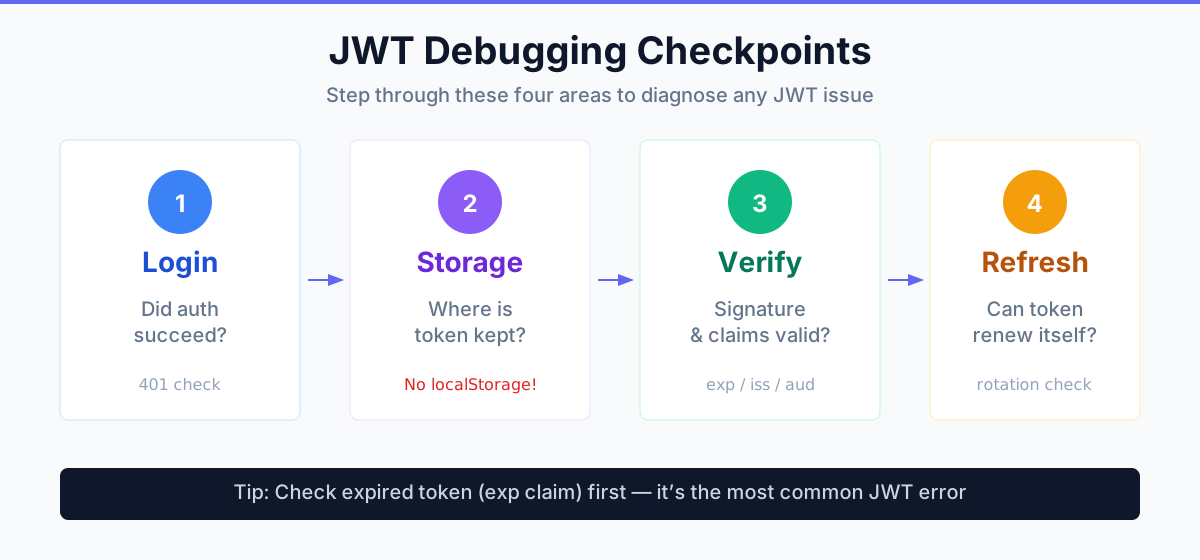
Am I looking at a login problem, a token storage problem, a verification problem, or a refresh problem?
That one question can save hours.
 Click to expand